Local AI with Ollama, Python, and Rust: architecture, REST API, and when to use each language
Understand Ollama's architecture, use the REST API with curl and jq (chat, streaming, JSON Schema, embeddings, and the OpenAI-compatible endpoint), configure the server securely, and learn when to pick Python or Rust.
AI$ curl localhost:11434/api/chat▍Running a model with ollama run is the first step. The second is putting it inside a program: a script that classifies tickets, a CLI that summarizes logs. Everything goes through the HTTP API on localhost:11434. This guide opens a series: here you get the architecture, the REST API, and the choice between Python and Rust; the details live in Ollama with Python and Ollama with Rust.
Why build on local Ollama
- Privacy: prompts and documents never leave the machine, which makes conversations about privacy laws such as Brazil’s LGPD or the GDPR easier. The security of the computer itself (disk encryption, access control, logs) is still on you.
- Cost under control: there is no per-token billing, just hardware and power. Automated tests and big batches don’t turn into a surprise on the bill.
- Offline: after the
pull, everything works without internet. - Latency: there is no round trip to the cloud, but generation speed depends on your CPU, GPU, and memory.
The limits: the model has to fit in memory, and without a GPU long answers get slow; models that fit on a laptop are usually less capable than the largest hosted models; and updating, monitoring, and securing the server is your job.
Architecture: from your code to the model
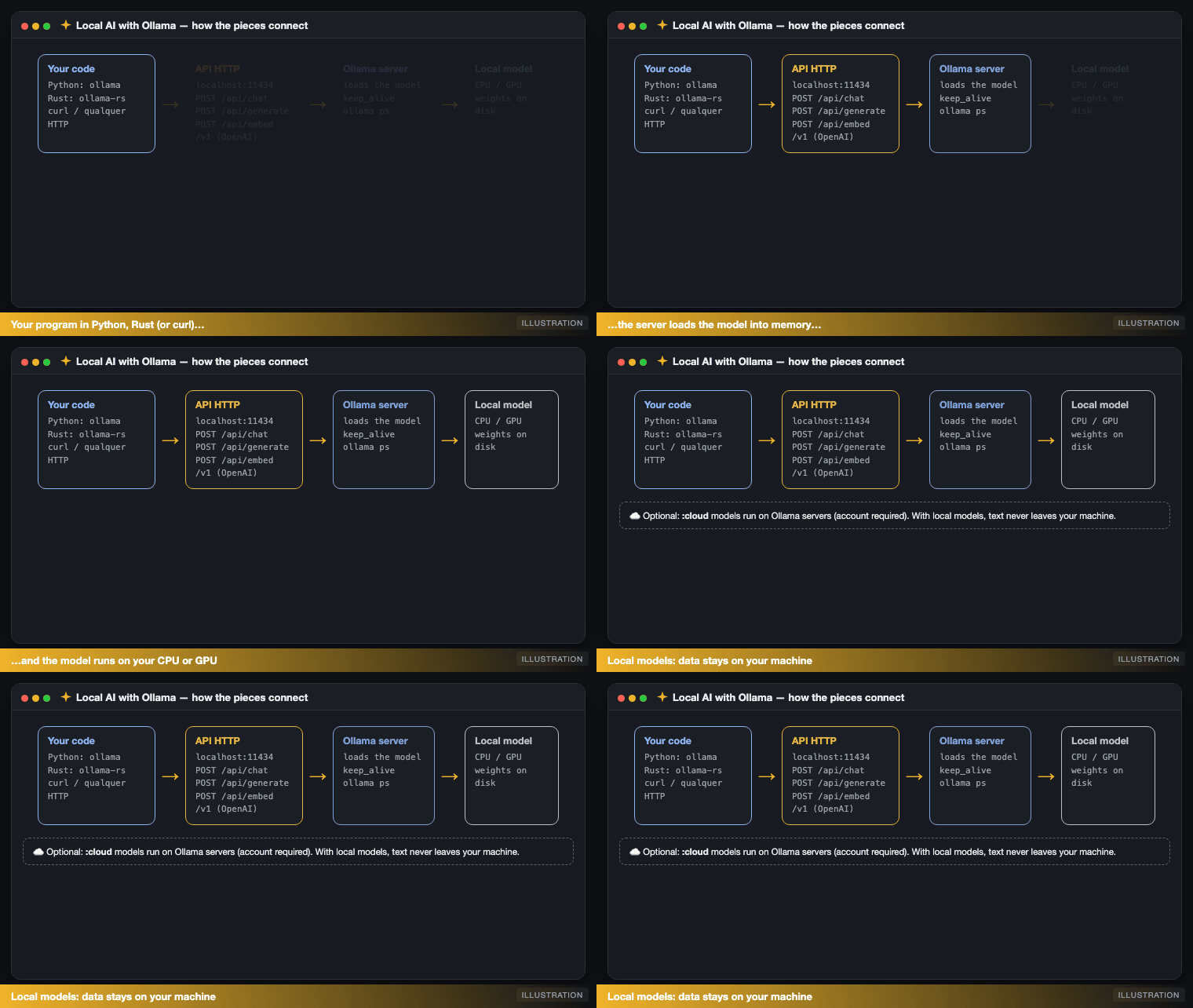 Animated illustration (not a real screenshot): your code calls the API on localhost:11434, the Ollama server loads the model and manages keep_alive, and the model runs on CPU or GPU; at the bottom, the optional
:cloud models. The real interface may use different names and positions.
- Your code: Python with the
ollamalibrary, Rust with theollama-rscrate, or plaincurl. They all speak HTTP. - The API: native endpoints (
/api/chat,/api/generate,/api/embed) and an OpenAI-compatible layer at/v1. - The server: loads the model into memory when needed and keeps it there for the
keep_aliveduration.ollama psshows what is loaded. - The model: runs on the GPU when it fits in VRAM (or in Apple Silicon’s unified memory); otherwise, fully or partly on the CPU.
That’s why the first call after some idle time is slower: it includes loading (the load_duration field).
First steps in the terminal
Installation is covered in Meet Ollama. Pick a model at ollama.com/library (a small one is enough to test on a laptop) and store its name in OLLAMA_MODEL, which the examples in this series read:
ollama pull <model>
ollama run <model> "Explain what a container is in one sentence."
ollama ps # SIZE, PROCESSOR (GPU or CPU), and UNTIL
export OLLAMA_MODEL=<model>
curl -s localhost:11434/api/version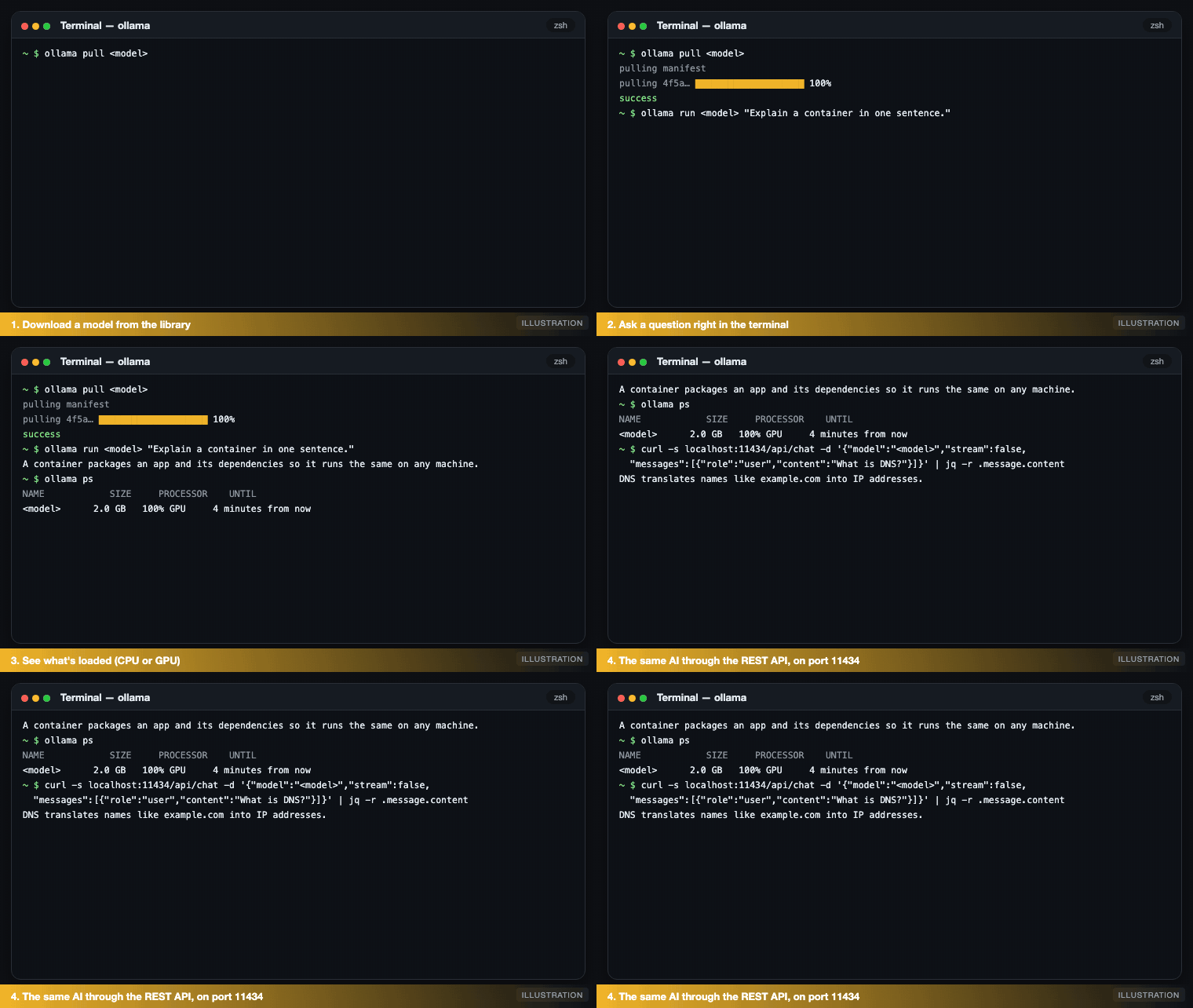 Animated illustration (not a real screenshot):
ollama pull with a progress bar, ollama run answering, ollama ps with SIZE, PROCESSOR, and UNTIL, and the same question through curl and jq. The real interface may use different names and positions.
REST API: the essentials
The full reference is at docs.ollama.com. If REST is new to you, see what a REST API is.
| Endpoint | Method | What for |
|---|---|---|
/api/chat |
POST | Conversation with message history |
/api/generate |
POST | Single prompt, no history |
/api/embed |
POST | Vectors for semantic search and RAG |
/api/tags |
GET | Installed models |
/api/ps |
GET | Models loaded in memory |
/api/version |
GET | Server version |
/v1/chat/completions |
POST | Chat in the OpenAI API format |
Chat without streaming
curl -s http://localhost:11434/api/chat -d '{
  "model": "<model>",
  "messages": [
    {"role": "system", "content": "Answer in English, in two sentences at most."},
    {"role": "user", "content": "What is a pod in Kubernetes?"}
  ],
  "stream": false
}' | jq -r '.message.content'
Without the filter, you see the whole object: message, done: true, done_reason, and metrics such as total_duration and eval_count, with durations in nanoseconds. The endpoint is stateless: to continue the conversation, resend the history with the previous answer in the assistant role.
Streaming as NDJSON
Without "stream": false, the response arrives as NDJSON: one JSON object per line, each with a piece of the text.
# -N turns off curl's buffering
curl -sN http://localhost:11434/api/chat -d '{
  "model": "<model>",
  "messages": [{"role": "user", "content": "Count from 1 to 3."}]
}'
{"model":"<model>","created_at":"…","message":{"role":"assistant","content":"1"},"done":false}
{"model":"<model>","created_at":"…","message":{"role":"assistant","content":", 2"},"done":false}
{"model":"<model>","created_at":"…","message":{"role":"assistant","content":", 3"},"done":false}
{"model":"<model>","created_at":"…","message":{"role":"assistant","content":""},"done":true,"done_reason":"stop","total_duration":…,"eval_count":…}The last line has done: true and the stats. To see only the text, append | jq -j --unbuffered '.message.content'. In your own client, buffer bytes up to the line break before parsing; the Python and Rust libraries already do this.
Structured output with JSON Schema
The format field accepts "json" or a JSON Schema, and the server constrains generation to that shape:
curl -s http://localhost:11434/api/chat -d '{
  "model": "<model>",
  "messages": [{"role": "user", "content": "Log: checkout returned 500 for 20 minutes after the deploy. Extract service, severity, and summary."}],
  "stream": false,
  "format": {
    "type": "object",
    "properties": {
      "service": {"type": "string"},
      "severity": {"type": "string"},
      "summary": {"type": "string"}
    },
    "required": ["service", "severity", "summary"]
  },
  "options": {"temperature": 0}
}' | jq -r '.message.content' | jq .
The schema guarantees the shape, not the content: in our tests, a very small model returned valid JSON with nonsense values, and a num_predict set too low cut the JSON in half. Always validate in code (Pydantic in Python, serde in Rust), use temperature 0, and pick a capable enough model.
Parameters: options and keep_alive
curl -s http://localhost:11434/api/chat -d '{
  "model": "<model>",
  "messages": [{"role": "user", "content": "Summarize this log in three bullet points: ..."}],
  "stream": false,
  "options": {"temperature": 0.2, "num_ctx": 8192},
  "keep_alive": "30m"
}' | jq -r '.message.content'temperature: close to 0 gives more predictable answers, good for extraction and classification.num_ctx: the context window in tokens. More context, more memory.keep_alive: how long the model stays loaded after the request. The default is 5 minutes;0unloads right after the answer, and a negative value keeps the model loaded indefinitely. To unload immediately, useollama stop <model>.
Embeddings with /api/embed
Embeddings turn text into vectors for semantic search and RAG, and they require an embedding model (look for the ones tagged for embeddings in the library). In our tests, a chat model returned HTTP 501.
ollama pull <embedding-model>
curl -s http://localhost:11434/api/embed -d '{
  "model": "<embedding-model>",
  "input": ["kubernetes pod", "docker container"]
}' | jq '.embeddings | length, (.[0] | length)'
input accepts a string or a list; the jq filter shows how many vectors came back and how many dimensions each one has.
Installed and loaded models: /api/tags and /api/ps
curl -s http://localhost:11434/api/tags | jq -r '.models[].name'
curl -s http://localhost:11434/api/ps | jq '.models[] | {name, size_vram, expires_at}'
These are the HTTP equivalents of ollama list and ollama ps, handy as health checks in a deploy script.
OpenAI-compatible endpoint
curl -s http://localhost:11434/v1/chat/completions \
  -H "Content-Type: application/json" \
  -d '{
    "model": "<model>",
    "messages": [{"role": "user", "content": "Summarize what CI/CD is in one sentence."}]
  }' | jq -r '.choices[0].message.content'
We tested this endpoint: it answers in the OpenAI format, and many tools work just by pointing the base URL at http://localhost:11434/v1; if the client requires a key, any value works. Compatibility covers the essentials, not necessarily every field: check the docs.
Python or Rust: when to use each language
The heavy lifting is the model’s, so the client language barely changes response time. What changes is everything else: development speed, distribution, your service’s memory, and compiler guarantees.
| Criterion | Python | Rust |
|---|---|---|
| Library | ollama 0.6.3, official from the project |
ollama-rs 0.3.6, community-maintained |
| Best for | Prototypes, notebooks, data, RAG | CLIs, services, long-running processes |
| Structured output | Pydantic: model_json_schema() and model_validate_json() |
serde: deserialization into strong types |
| Streaming | stream=True in a for loop |
stream feature + tokio-stream |
| Distribution | Interpreter + dependencies (venv or container) | Single compiled binary |
| Performance and memory | Enough for most scripts | Low footprint, no GC, memory safety checked by the compiler |
| Learning curve | Low | Steeper (ownership, async with Tokio) |
Python: the official library
The minimum with the library maintained by the project itself:
# pip install ollama
import os
from ollama import chat

model = os.environ["OLLAMA_MODEL"]
response = chat(model=model, messages=[{"role": "user", "content": "Explain a container in one sentence."}])
print(response.message.content)
Rust: the community crate
There is no official Rust client: the official libraries are Python and JavaScript, and Ollama’s README lists ollama-rs (by pepperoni21) among the community ones. Heads-up: in 0.3.6, the GenerationRequest path in the crate’s README is wrong; use the one in the example.
[dependencies]
ollama-rs = { version = "0.3.6", features = ["stream"] }
tokio = { version = "1", features = ["macros", "rt-multi-thread"] }
use ollama_rs::{generation::completion::request::GenerationRequest, Ollama};
#[tokio::main]
async fn main() -> Result<(), Box<dyn std::error::Error>> {
let model = std::env::var("OLLAMA_MODEL")?;
let ollama = Ollama::default(); // http://127.0.0.1:11434
let res = ollama
.generate(GenerationRequest::new(model, "Explain a container in one sentence."))
.await?;
println!("{}", res.response);
Ok(())
}Without the crate, you can call the API with reqwest and serde_json.
Decision guide
- Python to validate an idea in hours, work with data and notebooks, build a RAG, or automate internal tasks: Ollama with Python.
- Rust for a CLI shipped as a single binary, an always-on service with a small memory footprint, or when memory safety and types weigh in: Ollama with Rust.
- Plain HTTP when the integration is small and you don’t want to depend on a library.
- Both: prototype in Python and rewrite in Rust only what becomes a product. The contract is the same API.
Server configuration
| Variable | What for | Example |
|---|---|---|
OLLAMA_HOST |
Listen address and port (default 127.0.0.1:11434) |
0.0.0.0:11434, carefully |
OLLAMA_KEEP_ALIVE |
How long models stay loaded (default 5 minutes) | 30m |
OLLAMA_CONTEXT_LENGTH |
Default context window for all models | 8192 |
OLLAMA_NUM_PARALLEL |
Requests each model processes at the same time | 2 |
OLLAMA_NO_CLOUD |
Local-only mode: no cloud models and no web search | 1 |
A request’s keep_alive takes precedence over OLLAMA_KEEP_ALIVE. Memory grows with parallel requests times context, so raise both carefully. The full list is in ollama serve --help; version your configuration as in environment variables in the 12-factor app.
# Linux (systemd service)
sudo systemctl edit ollama
# in the editor, add:
# [Service]
# Environment="OLLAMA_KEEP_ALIVE=30m"
# Environment="OLLAMA_NO_CLOUD=1"
sudo systemctl daemon-reload && sudo systemctl restart ollama

# macOS (app): set it and restart Ollama
launchctl setenv OLLAMA_KEEP_ALIVE 30m
Security
- The API has no authentication. By default it listens only on
127.0.0.1. WithOLLAMA_HOST=0.0.0.0, anyone who can reach port 11434 can use your GPU and pull or delete models. For remote access, use a firewall, a reverse proxy with authentication and TLS, or a VPN. Never expose the port to the internet. - Prompt injection. Documents, emails, and tickets can carry hidden instructions, and the model may follow them, even when it runs locally. Separate instructions from data, give the model minimal permissions, and see AI application security with the OWASP Top 10 for LLMs.
- Validate outputs. Treat the answer as untrusted input: validate it with a schema, don’t run generated commands or SQL without review, and escape the text before displaying it.
- Cloud models send data out.
:cloudmodels run on Ollama’s servers (they requireollama signin), and, according to the docs, they don’t support structured outputs. To keep everything local, useOLLAMA_NO_CLOUD=1. Personal data is still subject to privacy laws such as the LGPD or the GDPR.
Docker and Kubernetes
To isolate the server in a container (see what Docker is):
docker run -d -v ollama:/root/.ollama -p 11434:11434 --name ollama ollama/ollama
docker exec -it ollama ollama pull <model>
The ollama volume keeps the models. Heads-up: -p 11434:11434 publishes the port on every host interface; to keep it local only, use -p 127.0.0.1:11434:11434. For an NVIDIA GPU, add --gpus=all (requires the NVIDIA Container Toolkit). For many users with autoscaling, see running LLMs on Kubernetes with vLLM.
Checklist
- I picked a model that fits in memory and stored its name in
OLLAMA_MODEL - I tested
/api/chatwithcurlandjqbefore writing code - I validated every structured output with Pydantic or serde
- I used an embedding model, not a chat model, with
/api/embed - I tuned
keep_alive,num_ctx, and parallelism to the available memory - I kept the API on
127.0.0.1or behind a firewall or an authenticating proxy - I chose between Python, Rust, or plain HTTP based on the kind of project
The model runs on your machine and the API is the contract: pick the language that best serves what you’ll build around it.