Google AI in 2026: Gemini, AI Studio, Stitch, Antigravity, and everything else (product guide)
A map of Google's AI products in 2026: what each one is, who it's for, how to access it, and when to use it, with this year's renames and shutdowns, a decision table, and data precautions.
AI$ export GEMINI_API_KEY=...▍“Just use Gemini,” a coworker says. But which one? The phone app, the panel inside Gmail, AI Studio, the API, Gemini Notebook, or Antigravity? Google has more than a dozen AI products, many with “Gemini” in the name, and 2026 was a year of renames and goodbyes.
This guide organizes everything by group. A heads-up first: Google changes names, features, and plans often, so always check the official pages. The information below is current as of November 2026.
Why it’s so confusing
Three reasons explain the mess:
- “Gemini” is both a family of models and a product brand. The Gemini models (the “brains” behind it all) show up inside the Gemini app, Workspace, AI Studio, the API, and coding tools.
- Many products started as Google Labs experiments and were later merged or shut down.
- 2026 brought several renames: NotebookLM became Gemini Notebook, Vertex AI became Gemini Enterprise Agent Platform, Gems are turning into skills, and some products are being switched off.
The illustration below sums up the map by audience:
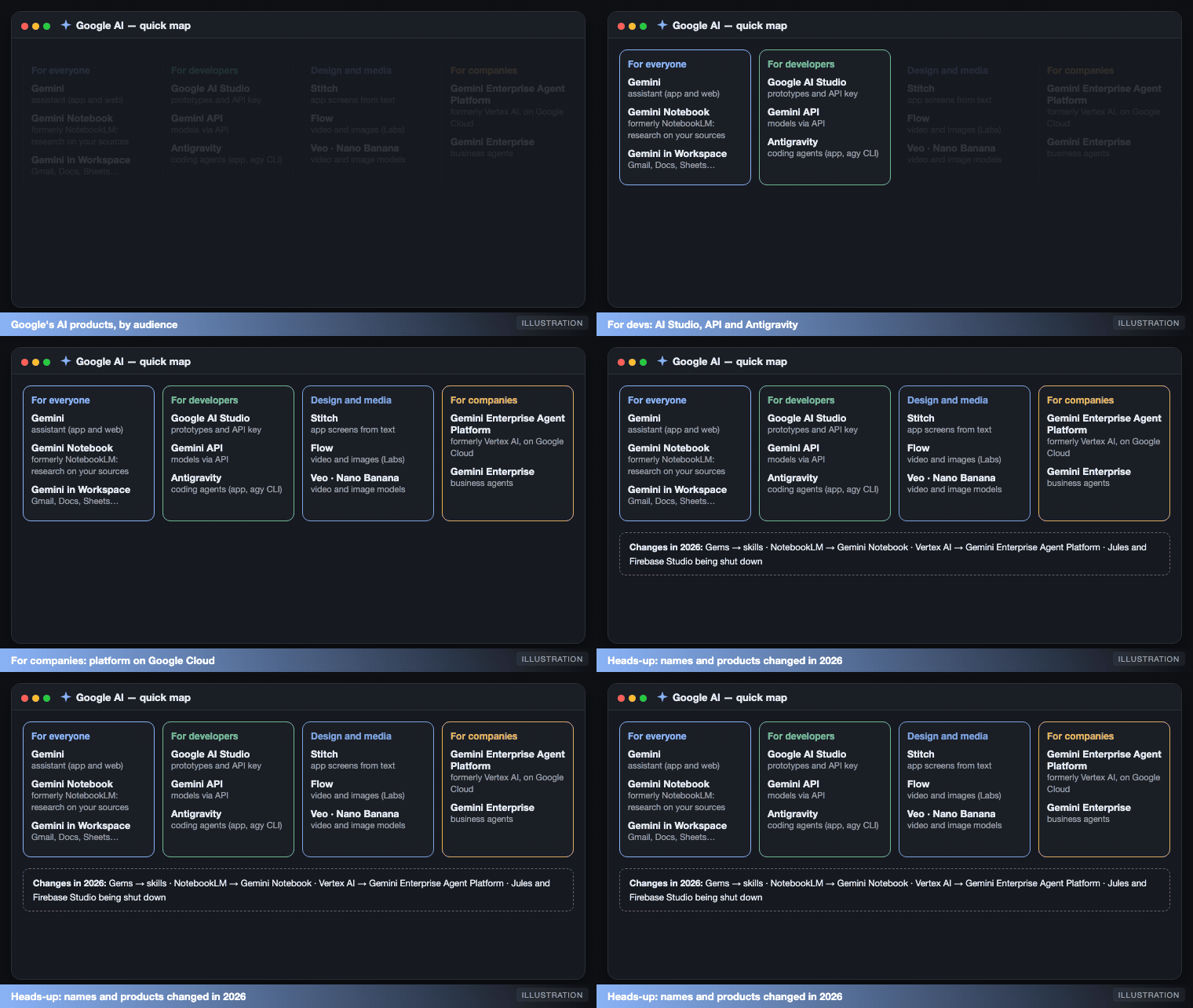 Animated illustration (not a real screenshot): products grouped for everyday users, developers, and businesses, followed by the 2026 changes. The real interface may use different names and positions.
The products, group by group
Almost all of them need only a Google Account to get started. Some features require users to be 18 or older, or are available only in certain countries and languages.
Gemini app
What it is: Google’s general-purpose AI assistant (formerly Bard), at gemini.google.com, in the Android and iOS apps, and in desktop apps. Who it’s for: anyone.
Beyond chat with files and image generation, the highlights are:
- Deep Research: you ask a question, Gemini proposes a research plan, you adjust it, and it checks many websites to build a long report with sources.
- Canvas: a space to write and edit documents and code, and to create pages, infographics, and quizzes.
- Gemini Live: real-time voice conversation.
- Skills: reusable custom instructions, invoked with
/skill-name. They replace Gems starting in November 2026 on personal accounts (in 2027 on work and school accounts).
When to use it: writing, summarizing, researching, and answering everyday questions. The step-by-step is in how to use Gemini.
Gemini in Google Workspace
What it is: Gemini inside Gmail, Docs, Sheets, Slides, Drive, Chat, and Calendar, with a side panel and help writing emails, documents, and spreadsheets. Who it’s for: companies and schools that use Workspace. The features are included in the subscriptions, some require higher-tier plans, and the administrator decides what is turned on.
When to use it: when the task depends on your work emails and documents.
Gemini Notebook (formerly NotebookLM)
What it is: a study and research assistant that answers only from the sources you upload (PDFs, Google Docs, links, public YouTube videos, audio files), always with citations. It creates podcast-style audio overviews, mind maps, and quizzes. Since July 2026 it has been called Gemini Notebook and lives at notebook.google; notebooks also show up in the Gemini app.
When to use it: studying or cross-referencing documents without the AI “making things up” beyond them.
Google AI Studio and the Gemini API
What it is: AI Studio (aistudio.google.com) is the free browser-based tool for developers to try the Gemini models, write system instructions, adjust parameters, and click Get code to see the ready-made call. Build mode generates web or Android apps from a description. It’s also where you create a key for the Gemini API, which has a free tier and a paid tier.
When to use it: prototyping an idea or integrating Gemini into your system. A first contact with the API:
# 1. Store the key created at aistudio.google.com/apikey in an environment variable
export GEMINI_API_KEY="paste-your-key-here"

# 2. List the models available to your key
curl -s "https://generativelanguage.googleapis.com/v1beta/models" \
  -H "x-goog-api-key: $GEMINI_API_KEY"

# 3. Send a prompt (replace MODEL_NAME with a name from the list above)
curl -s "https://generativelanguage.googleapis.com/v1beta/models/MODEL_NAME:generateContent" \
  -H "x-goog-api-key: $GEMINI_API_KEY" \
  -H "Content-Type: application/json" \
  -X POST \
  -d '{"contents":[{"parts":[{"text":"Explain in 3 sentences what Google AI Studio is."}]}]}'
Never put the key in code or in the repository; see environment variables and the 12-factor app. The full guide is in how to use Google AI Studio.
Google Antigravity and the Gemini CLI
What it is: Google Antigravity (antigravity.google) is Google’s agentic development platform. It includes a desktop app that coordinates several agents in parallel, the agy CLI for the terminal, and extensions for IDEs such as VS Code and JetBrains. Agents show what they did through artifacts: task lists, plans, screenshots, and browser recordings. It uses the Gemini models and some third-party models. There is a free plan with weekly limits.
What about the Gemini CLI? It is still open source (Apache 2.0 license), but according to the official repository it is now aimed at enterprise and Gemini Code Assist customers or people using paid keys; individual users have been pointed to the agy CLI.
When to use it: coding with agents on your computer. To compare it with other tools, see Claude Code, Grok, ChatGPT, and Copilot: when to use each.
Stitch
What it is: a Google Labs experiment for designing interfaces with AI. You describe the app (or upload images), and it generates web and mobile screens on an infinite canvas; then you refine them by chat or voice and connect the screens into a clickable prototype. It has moved: it’s now at stitch.google.com. It exports to Antigravity and AI Studio and publishes to the web; the original announcement mentioned copying to Figma, so check whether that is still available.
When to use it: going from zero to a visual prototype in minutes. Step-by-step in how to use Google Stitch.
Flow, Veo, and Nano Banana
What it is: Flow is Google Labs’ creative studio for video and, since February 2026, for images too: it absorbed Whisk and ImageFX. It runs on credits: there’s a limited free allowance and more credits on paid plans. Behind it are the Veo models (short videos with audio) and the Nano Banana models (image generation and editing), also available in the Gemini app (video on paid plans) and in the Gemini API.
When to use it: creating and editing images and short videos.
Gemini Enterprise Agent Platform and Gemini Enterprise
What it is: Gemini Enterprise Agent Platform is the new name, since April 2026, of Vertex AI on Google Cloud: a model catalog, an agent studio, runtime, governance, and security. It requires a Google Cloud project with billing. Gemini Enterprise is a different product: an agent suite for businesses, sold in editions.
When to use it: when the company needs data control, auditing, and cloud integration.
What changed or is ending in 2026
| Product | Change | What to do |
|---|---|---|
| Gems (Gemini app) | Turning into skills: read-only since 11/17/2026 and removed on 12/17/2026 on personal accounts; work and school accounts in 2027 | Check that your Gems migrated to skills |
| NotebookLM | Renamed Gemini Notebook (July 2026), at notebook.google | Update bookmarks; your notebooks remain |
| Vertex AI | Renamed Gemini Enterprise Agent Platform (April 2026) | Update documentation and internal names |
| Jules | Read-only since 11/11/2026; shuts down on 12/31/2026 | Export what you need; suggested alternative: Antigravity |
| Firebase Studio | No new workspaces; shuts down on 3/22/2027 with data deletion | Migrate to AI Studio or Antigravity |
| Gemini Code Assist (individual plans) | Ended in June 2026; Standard and Enterprise editions continue | Use Antigravity |
| Imagen (Gemini API) | Shut down in the Gemini API | Use the Nano Banana models |
| Whisk and ImageFX | Folded into Flow (February 2026) | Use Flow |
If you want to… use…
| If you want to… | Use… |
|---|---|
| Chat, write, summarize, and research | Gemini app (with Deep Research and Canvas) |
| AI inside your company’s Gmail, Docs, and Sheets | Gemini in Workspace |
| Study documents with cited answers | Gemini Notebook |
| Test prompts and generate an API key | Google AI Studio |
| Integrate Gemini into your system | Gemini API |
| Code with agents on your computer | Google Antigravity |
| Design app screens and prototypes | Stitch |
| Create images and videos | Flow or the Gemini app |
| Enterprise governance in the cloud | Gemini Enterprise Agent Platform |
Plans: what’s free and what’s paid
With a Google Account you can use the Gemini app, Gemini Notebook, AI Studio, and Antigravity’s basic plan for free, with limits. The Google AI Plus, Pro, and Ultra plans raise those limits and unlock more models and features, such as video generation and more Flow credits. At work, Gemini comes with Workspace subscriptions, and the Agent Platform is billed by usage on Google Cloud. Prices and limits change, so check the official pages.
Data and privacy
The rule of thumb: free and personal is no place for sensitive data.
- AI Studio and the Gemini API on the free tier: Google may use prompts and responses to improve its products, and human reviewers may read them. Don’t send personal or confidential data, or secrets. On the paid tier, data is not used for that purpose, according to the terms.
- Gemini app on a personal account: how your activity is used depends on your account settings; see the Gemini Apps Privacy Hub.
- Workspace and Google Cloud: they follow enterprise terms controlled by the administrator. Check with IT what is approved.
Personal data about customers and coworkers is protected by privacy laws such as Brazil’s LGPD or the GDPR: before pasting anything, check the plan’s terms and your company’s policy. The list of what to avoid is in don’t do this with AI.
Checklist
- I identified which Google product solves my task
- I updated old names: Gemini Notebook, Agent Platform, and skills
- I checked whether I use Jules or Firebase Studio and planned the migration
- I stored the Gemini API key in an environment variable, outside the code
- I didn’t send sensitive data to free services or personal accounts
- I checked with IT which tools and accounts the company approved
- I confirmed the current features and plans on the official pages
At Google, names change fast; the right question stays the same: which product solves my task while keeping my data safe?