How to use Microsoft Foundry (formerly Azure AI Foundry): from the model catalog to the Azure OpenAI v1 API
A practical Microsoft Foundry guide for developers and DevOps: the new names, the single-resource architecture with projects, a step-by-step from the catalog to the playground, calling the Azure OpenAI v1 API with curl and Python, Entra ID, privacy, Foundry Tools, and cost control.
AI$ pip install openai▍If you have used Azure OpenAI, opened “Azure AI Studio,” or created a hub in “Azure AI Foundry,” the portal may have looked unfamiliar the last time you signed in. The name changed, the architecture changed, and even the API got simpler: you no longer need api-version. This guide shows what Microsoft Foundry is today, how to go from zero to a model answering in the playground, and how to call it from your code. For the full map of products, see the overview of Microsoft AI.
What Microsoft Foundry is
Microsoft Foundry is Azure’s platform for developers to build AI applications and agents. The portal lives at ai.azure.com and brings together:
- Models: a catalog with thousands of options, from Microsoft itself, from Azure OpenAI, and from other providers such as Anthropic, Meta, Mistral, DeepSeek, Cohere, and xAI.
- Foundry Agent Service: for building agents (prompt-based, hosted, or voice).
- Tools: a tool catalog for agents, with support for MCP servers and the A2A protocol.
- Evaluations and tracing: measuring response quality and tracing every call (the subject of LLMOps, evaluation, and observability).
- Guardrails: the former content filters, which block harmful content and jailbreak attempts.
The names: from Azure AI Studio to Microsoft Foundry
Microsoft changed several names in a short time. This table helps you read older docs and posts:
| Current name | Previous names |
|---|---|
| Microsoft Foundry | Azure AI Studio → Azure AI Foundry |
| Foundry Tools | Azure Cognitive Services → Azure AI Services |
| Foundry IQ | Azure Cognitive Search → Azure AI Search |
| Guardrails | Content filters |
| Foundry User / Foundry Owner roles | Azure AI User / Azure AI Owner |
The switch to Microsoft Foundry has applied in the product terms since January 1, 2026. Licenses, invoices, and older pages may still show the old names.
What changed in the architecture
Before, a typical project mixed three pieces: a Hub, an Azure OpenAI resource, and an AI Services resource. Now there is a single Foundry resource (type Microsoft.CognitiveServices/accounts, kind AIServices) with child projects. Each project isolates the work of one team or application, and the resource holds networking, quotas, and access.
Three practical consequences:
- Azure OpenAI resources can be upgraded to Foundry resources while keeping the same endpoint and the same keys. Your applications keep working.
- Hub-based projects only show up in the classic portal.
- The portal has a New Foundry toggle. Turned on, you see the new portal, with the Home, Discover, Build, Manage, and Docs sections. Turned off, you go back to the classic one.
Requirements
- An Azure subscription (there is a free account for testing).
- An account in Microsoft Entra ID, Azure’s corporate identity service.
- The right role: Foundry User for people building inside a project; Foundry Owner (or Account Owner) to create resources and projects. Ask your cloud team for the minimum you need.
Step by step: from project to playground
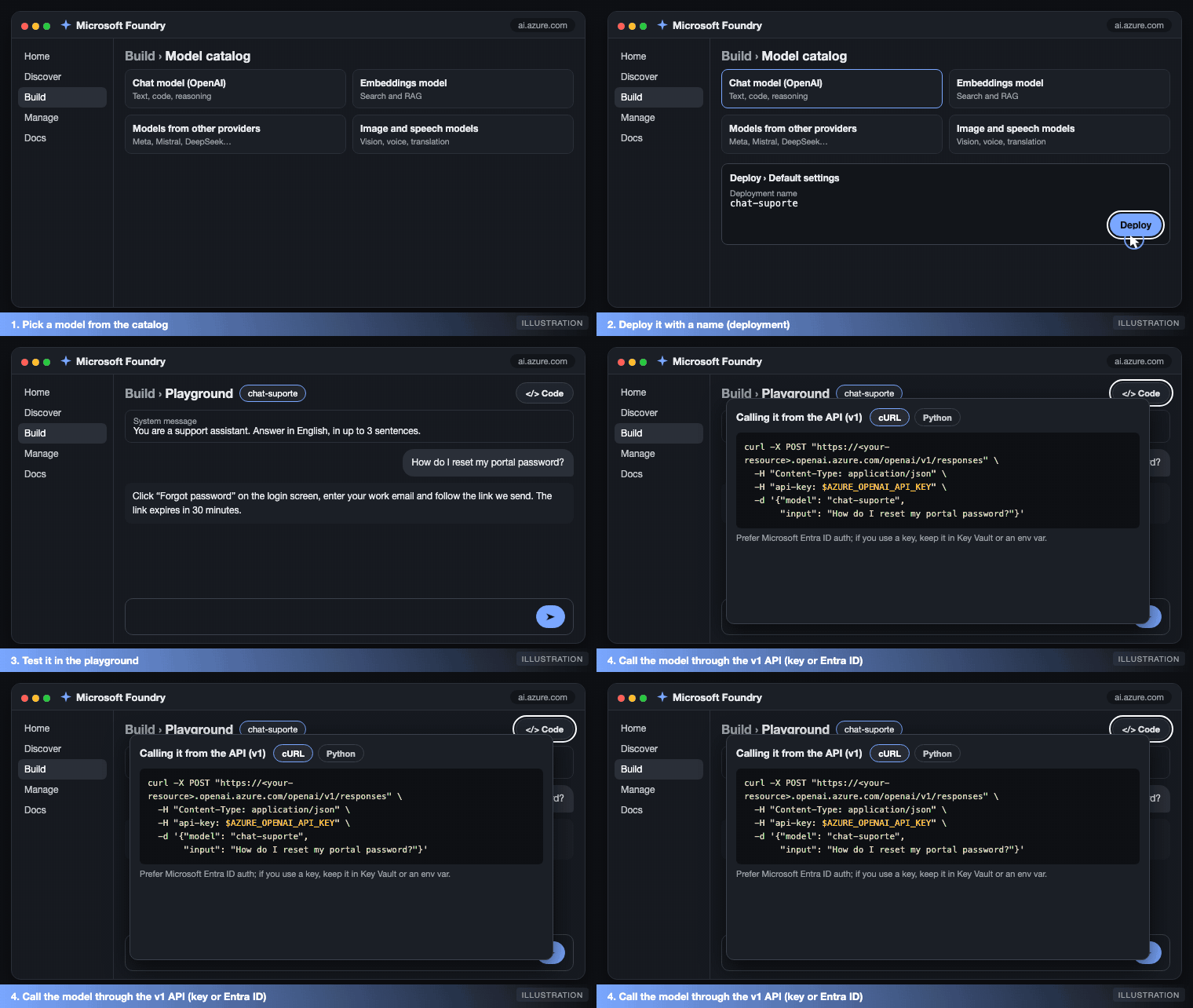 Animated illustration (not a real screenshot): Build › Model catalog, picking a chat model, Deploy › Default settings with the deployment name, a test in the playground, and a code panel with curl to /openai/v1/responses using the key from an environment variable (with the tip to prefer Entra ID). The real interface may use different names and positions.
The path, according to the official quickstart:
- Sign in at ai.azure.com with the New Foundry toggle on.
- Click Create a new project and give the project a name.
- Open Advanced options to choose the resource group and region. The region matters: not every model or feature exists in every region.
- Click Create project.
- Go to Build > Catalog > Model Catalog and look for an OpenAI chat model. Names change often; pick from the current catalog.
- Click Deploy > Default settings. This creates a deployment: an instance of the model under a name you choose, which is what your code will call.
- You land in Build, with the model selected in the playground. Write a prompt and see the answer.
- Optional: in Build > Agents > Create agent, create an agent with instructions and tools.
The project endpoint shows up on the project’s welcome screen. It has the format https://<your-resource>.services.ai.azure.com/api/projects/<your-project> and is used by the Foundry SDK (azure-ai-projects) for agents and evaluations.
Calling the model with the v1 API
Azure OpenAI now uses v1 routes, without the api-version parameter that changed every few months. It is a regular REST API: JSON over HTTP. The model field takes the deployment name, not the model name:
curl -X POST "https://<your-resource>.openai.azure.com/openai/v1/responses" \
  -H "Content-Type: application/json" \
  -H "api-key: $AZURE_OPENAI_API_KEY" \
  -d '{
    "model": "<deployment-name>",
    "input": "Explain in 3 sentences what a deployment is in Microsoft Foundry."
  }'
This example uses the Responses API, the current interface. The /openai/v1/chat/completions route, with the messages field, also exists for legacy code. The Responses API is not available in every region; check before choosing where to create the resource.
In Python, with the openai package
You don’t need a special SDK: the standard OpenAI() client works, pointing base_url at your resource. Install it with pip install openai and run:
import os
from openai import OpenAI

client = OpenAI(
    api_key=os.getenv("AZURE_OPENAI_API_KEY"),
    base_url="https://<your-resource>.openai.azure.com/openai/v1/",
)

r = client.responses.create(
    model="<deployment-name>",
    input="List 3 precautions for storing an API key.",
)
print(r.output_text)
output_text is an SDK shortcut that joins the response text. Use OpenAI(), not the old AzureOpenAI(): the v1 route does away with api-version.
Prefer Entra ID over keys
An API key is a shared secret: whoever has the key has the access. Microsoft Entra ID replaces that with identity: each person or application gets a temporary token, with roles (RBAC) and auditing. In production, use a managed identity on the service that calls the model. To test from the terminal with the Azure CLI:
# Entra ID token with the Foundry scope
TOKEN=$(az account get-access-token --scope https://ai.azure.com/.default --query accessToken -o tsv)

curl -X POST "https://<your-resource>.openai.azure.com/openai/v1/responses" \
  -H "Content-Type: application/json" \
  -H "Authorization: Bearer $TOKEN" \
  -d '{"model": "<deployment-name>", "input": "Hello!"}'
If you need a key, store it in Azure Key Vault or in environment variables injected by the pipeline, never in code or in Git. The reasoning is in environment variables and the 12-factor app. Rotate it periodically: the resource has two keys precisely so you can swap one without taking the application down.
Retirements you need to know about
If your code is a few years old, check these points:
- Assistants API: retired on August 26, 2026. The way forward is the Responses API and Foundry Agent Service (Agents v2).
- The
azure-ai-inferencepackage: retired on the same date. Use theopenaipackage, as in the example above. - Azure OpenAI “On Your Data” (connecting the model directly to your data): there are signs it has also been discontinued. Check its status in the official docs before relying on it.
Old routes with api-version and the AzureOpenAI() client still show up in many tutorials. When migrating, test in a staging environment.
Data privacy
For models sold by Azure, including Azure OpenAI, the official privacy page says that prompts, responses, embeddings, and training data:
- are not available to other customers;
- are not available to OpenAI;
- are not used to train generative AI foundation models without your permission.
Important details:
- Abuse monitoring may lead to human review of flagged samples.
- Global and Data Zone deployment types may process data outside the resource’s region. If your company requires data to stay in a specific country or region, choose the deployment type carefully.
- Models from other providers may follow their own terms. Claude models in Foundry, for example, follow Anthropic’s terms.
Privacy laws such as Brazil’s LGPD or the GDPR still apply: personal data sent to the model needs a legal basis, minimization, and records. This guide is not legal advice; involve your company’s legal team and DPO.
Foundry Tools in one table
The former Azure AI Services are now called Foundry Tools. The main ones:
| Tool | What it’s for |
|---|---|
| Foundry IQ (formerly Azure AI Search) | Text search, vector search, and agentic retrieval; the foundation for RAG on Azure |
| Azure Speech | Speech to text, text to speech, and speech translation |
| Azure Vision | Image analysis and OCR |
| Document Intelligence / Content Understanding | Extracting fields from documents; the names vary across pages, so check the docs |
| Azure AI Content Safety | Detecting harmful content and jailbreaks; the basis for guardrails |
| Azure Language | Entities, PII, and text analysis; Language Studio will be retired on March 20, 2027 |
| Azure Translator | Translating text and documents |
In Foundry IQ, endpoints (*.search.windows.net), SDKs, and roles did not change with the new name.
Costs without surprises
Prices change and depend on the model, region, and deployment type; check the official page. What is worth planning for:
- Quotas: each model has tokens-per-minute limits per region. When you exceed them, the API returns a 429 error; handle it with retry and backoff.
- Deployment type: paying per use (Standard, Global, Data Zone) or reserving capacity (Provisioned) changes cost, latency, and where data is processed.
- Monitoring: create budgets and alerts in Azure Cost Management and track token consumption per application.
- Hygiene: delete forgotten test deployments and projects.
For metrics such as cost per token and per request, see FinOps for AI.
Checklist
- I turned on the New Foundry toggle and created a project in the right region
- I deployed a chat model and tested it in the playground
- My code uses the
/openai/v1/route with the deployment name, withoutapi-version - In production, I authenticate with Entra ID and a managed identity; keys live only in Key Vault
- I migrated anything that used the Assistants API or
azure-ai-inference - I chose the deployment type considering where data may be processed and privacy laws
- I set up budgets, alerts, and handling for 429 errors
Foundry got simpler on the outside: one resource, projects, and a v1 API compatible with the OpenAI SDK. The real work is still taking good care of identity, data, and costs.