Microsoft AI in 2026: Copilot, Copilot Studio, Microsoft Foundry, and Azure — what each one is
A map of Microsoft's AI products in 2026: how to tell personal Copilot from work Copilot, what Copilot Studio, Microsoft Foundry, Foundry Tools, and Azure Copilot are for, what was renamed, and how each one handles your data.
AI$ az login▍“Just ask Copilot.” Which one? The one on your phone, the one in your company’s Word, your dev team’s GitHub Copilot, the assistant in the Azure portal, or the agent someone built in Copilot Studio? Microsoft uses “Copilot” in more than ten products, and 2025 and 2026 brought a string of renames.
This guide sorts everything by group. Microsoft changes names, features, and plans often — check the official pages. The information here is current as of November 2026.
Why it’s so confusing
Three reasons explain the mess:
- “Copilot” is a brand, not a product. It shows up in the personal assistant, Office, Windows, GitHub, Azure, and security.
- Many names changed in a short time, such as Azure AI Foundry → Microsoft Foundry and Azure AI Search → Foundry IQ.
- Two different products are now both called “Microsoft Copilot.” The personal assistant always had that name; in 2026, the work product formerly called Microsoft 365 Copilot was also renamed Microsoft Copilot, and Microsoft 365 Copilot Chat became Microsoft Copilot Chat. Licenses may still show the old names.
The illustration below sums up the map by audience:
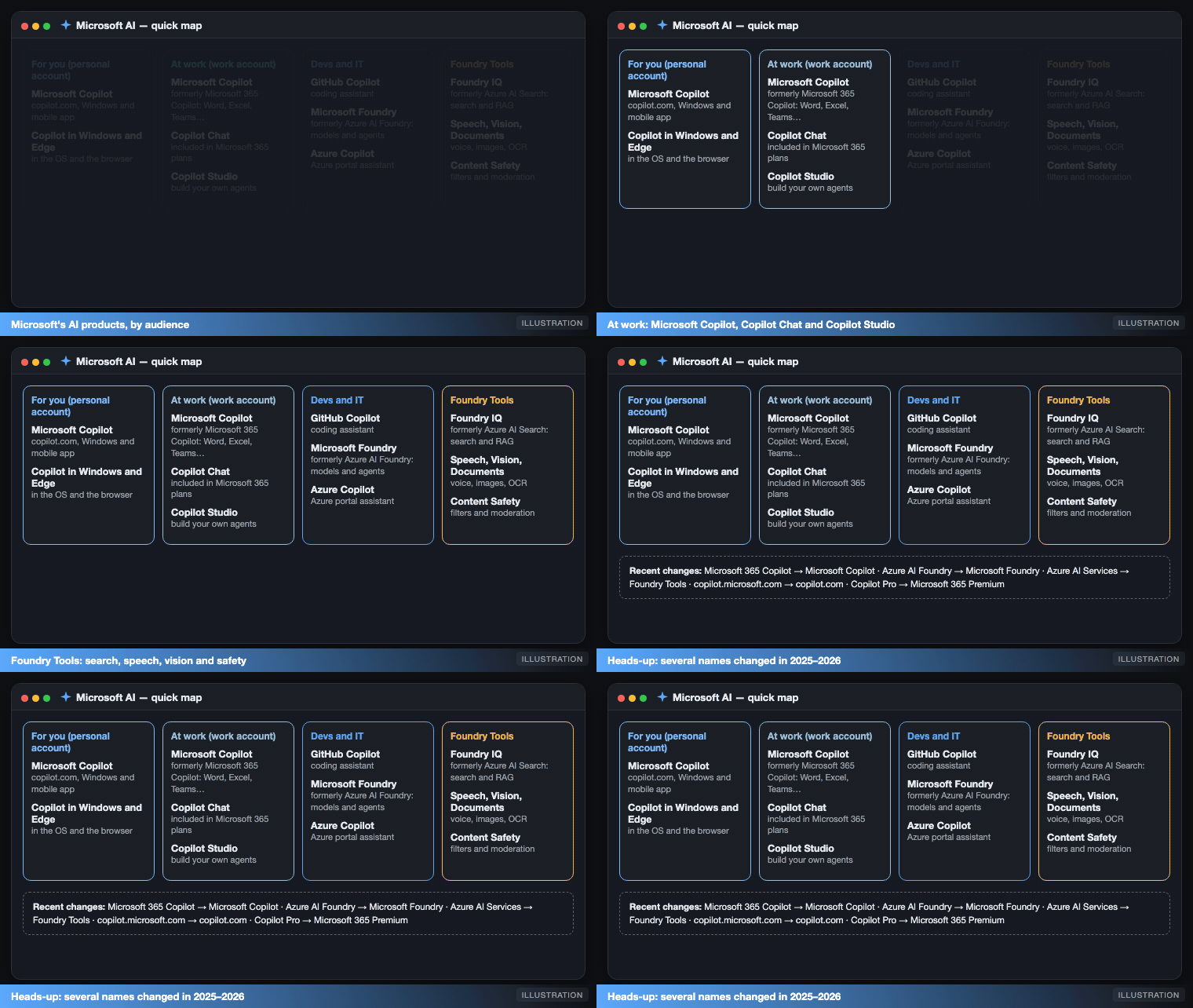 Animated illustration (not a real screenshot): products grouped for personal use, for work, and for developers and IT admins, plus Foundry Tools and the recent renames. The real interface may use different names and positions.
Personal Copilot or work Copilot? How to tell
The name is the same, but the data rules are different:
| Signal | Personal Copilot | Work Copilot |
|---|---|---|
| Account | Personal Microsoft account (or sign-in with Google/Apple) | Work or school account (Microsoft Entra ID) |
| Address | copilot.com | copilot.cloud.microsoft |
| On screen | No corporate marking | “Work” label and green data-protection shield |
| Who controls it | You | Your company’s IT admin |
Both can live in the same app, with an account switcher. Before you paste anything from work, check the label and the shield.
The products, group by group
Microsoft Copilot (personal)
What it is: the AI assistant for personal use, at copilot.com (the old copilot.microsoft.com redirects there) and in apps for Windows, Mac, iOS, and Android. It chats by text or voice, analyzes files, uses your camera or screen during voice sessions (vision), creates images in Create, and organizes conversations and files in Notebooks (formerly Projects).
Plans: basic use is free with a Microsoft account. The Microsoft 365 Personal, Family, and Premium plans raise the limits and bring Copilot to Word, Excel, PowerPoint, Outlook, and OneNote; Premium replaced Copilot Pro.
Heads-up: the updated Copilot app shipped on August 18, 2026. If you used the previous app, you need to sign in to the new one by December 31, 2026; according to Microsoft, content that hasn’t been migrated will be permanently deleted. Group Chat, Podcasts, Deep Research, and Copilot Labs were retired.
Microsoft Copilot at work and Copilot Chat
What it is: the enterprise assistant (formerly Microsoft 365 Copilot), at copilot.cloud.microsoft, in the Microsoft Copilot app, Edge, Outlook, Teams, and Word, Excel, and PowerPoint. It requires an Entra ID account and an eligible Microsoft 365 plan.
License tiers, in general terms:
- Copilot Chat: included with eligible plans. It answers from the web and only uses company data in cases such as when you attach a file.
- Paid Microsoft Copilot license: adds your emails, files, meetings, and chats (respecting each person’s permissions) plus the Researcher (research with sources) and Analyst (data analysis) agents.
- Usage-billed features, such as some autonomous agents, depend on your company’s contract.
In 2026 the app gained Home, with Chat (quick questions) and Cowork (you delegate a multi-step task, and it asks for approval before acting). In Word, Excel, and PowerPoint, a button in the corner of the document opens the Copilot pane; in Teams, it summarizes meetings. The step-by-step guide is in how to use Microsoft Copilot at work.
Copilot Studio
What it is: the low-code (little or no code) tool for building agents, at copilotstudio.microsoft.com. You describe the agent in natural language, add knowledge (websites, SharePoint, files), connect tools — connectors, flows, and MCP servers — and publish to Teams, Microsoft Copilot, and other channels. Usage is measured in Copilot Credits (formerly “messages”); the free trial lets you build and test, but not publish.
Example: an HR agent that answers questions about internal policies. See how to use Copilot Studio.
GitHub Copilot
GitHub’s coding assistant completes code, chats about the repository, and runs tasks as an agent. Since June 1, 2026, billing is usage-based, with credits consumed by model and volume; code suggestions are still included, and admins set budgets. To compare it with other tools, read AI coding assistants.
Microsoft Foundry
What it is: Azure’s platform for developers to build AI apps and agents (formerly Azure AI Studio and Azure AI Foundry), in the ai.azure.com portal. It brings together a catalog with models from OpenAI, Microsoft, and other providers (Anthropic, Meta, Mistral, DeepSeek…), Foundry Agent Service for agents, evaluations, tracing, and guardrails. It requires an Azure subscription.
The current API uses v1 routes, compatible with the standard OpenAI client. With the Azure CLI, you can call a model without a key in your code:
# 1. Sign in to Azure with your account (Microsoft Entra ID)
az login

# 2. Get a short-lived token for Microsoft Foundry
export TOKEN=$(az account get-access-token --scope https://ai.azure.com/.default --query accessToken -o tsv)

# 3. Call a deployed model through the v1 API (replace the resource and deployment)
curl -X POST "https://<your-resource>.openai.azure.com/openai/v1/responses" \
  -H "Content-Type: application/json" \
  -H "Authorization: Bearer $TOKEN" \
  -d '{"model": "<deployment-name>", "input": "Explain in 3 sentences what Microsoft Foundry is."}'
Your account needs a role on the resource, such as Foundry User. The alternative is the api-key header with the key in an environment variable. The Assistants API and the azure-ai-inference package were retired on August 26, 2026; use the Responses API and the openai package. Full guide in how to use Microsoft Foundry.
Foundry Tools
Ready-made AI services (formerly Azure AI Services), used through APIs:
- Foundry IQ (formerly Azure AI Search): vector search and retrieval for agents, the foundation of RAG. Endpoints and SDKs haven’t changed.
- Speech: speech to text, text to speech, and speech translation.
- Vision: image analysis and OCR.
- Document Intelligence and Content Understanding: extracting data from documents; how the two names relate varies across official pages.
- Content Safety: detects harmful content and jailbreaks; Foundry’s guardrails build on it.
- Language and Translator: text analysis and translation. Language Studio will be retired on March 20, 2027.
Azure Copilot
The Azure portal’s assistant (formerly “Microsoft Copilot in Azure”), with troubleshooting, deployment, observability, and optimization agents that your admin enables.
Security Copilot
A separate product for security teams to investigate incidents and threats across Defender, Entra, Intune, and Purview.
Windows AI and Copilot+ PCs
The Copilot app comes with Windows (Copilot key or Win+C). Copilot+ PCs have local features: Recall is still in preview, ships turned off (you opt in if you want it), requires Windows Hello, and keeps its snapshots only on your computer, encrypted; Click to Do analyzes the screen locally and can be turned off.
What changed in 2025–2026
| Old name or feature | Current name | What to do |
|---|---|---|
| Microsoft 365 Copilot | Microsoft Copilot (work) | Nothing changes for security; licenses may show the old name |
| Microsoft 365 Copilot Chat | Microsoft Copilot Chat | Same as above |
| copilot.microsoft.com | copilot.com | Update your bookmarks |
| Previous personal Copilot app | Updated app (August 2026) | Sign in to the new app by 12/31/2026 |
| Copilot Pro | Microsoft 365 Premium | Check the plan on your account |
| Projects (personal Copilot) | Notebooks | Your projects show up as Notebooks |
| Azure AI Studio / Azure AI Foundry | Microsoft Foundry | Update docs and links to ai.azure.com |
| Azure AI Services | Foundry Tools | Only the name changed |
| Azure AI Search | Foundry IQ | Endpoints and SDKs stay the same |
| Microsoft Copilot in Azure | Azure Copilot | Ask your admin to enable the agents |
| Assistants API and azure-ai-inference | Responses API and openai package | Migrate your code (retired 08/26/2026) |
| GitHub Copilot with premium requests | Usage-based billing (June 2026) | Set budgets for your team |
If you want to… use…
| If you want to… | Use… |
|---|---|
| Chat, write, and create images day to day | Microsoft Copilot (personal) |
| AI in your company’s Word, Excel, Outlook, and Teams | Microsoft Copilot at work |
| A secure chat without an extra license | Microsoft Copilot Chat |
| Build an agent without coding | Copilot Studio |
| Code with AI help | GitHub Copilot |
| Integrate AI models into your system | Microsoft Foundry |
| Search, speech, OCR, or translation via API | Foundry Tools |
| Help managing Azure resources | Azure Copilot |
| Investigate security incidents | Security Copilot |
Data and privacy
The rule of thumb: company data only goes into a work account.
- Work Copilot (Entra ID): enterprise data protection applies. According to Microsoft, prompts and responses are covered by the contract terms, logged for auditing, and “aren’t used to train foundation models.”
- Personal Copilot: your activity may be used to train models unless you opt out. The privacy FAQ, written for the previous app, lists exceptions — including users under 18 and users in some countries, such as Brazil; check whether it still applies.
- Microsoft Foundry: according to the documentation, prompts and responses for models sold by Azure are not available to other customers or to OpenAI and don’t train foundation models without your permission. Abuse monitoring may involve human review, and Anthropic models follow Anthropic’s terms.
Personal data about customers and coworkers is protected by privacy laws such as Brazil’s LGPD or the GDPR: check your plan’s terms and your company’s policy and, when in doubt, ask your legal team. The list of things to avoid is in don’t do this with AI.
To compare with other assistants, see Claude Code, Grok, ChatGPT, and Copilot: when to use each — written before the rename, it still uses the Microsoft 365 Copilot name. Google’s equivalent is in Google AI: Gemini, AI Studio, and Stitch.
Checklist
- I can tell personal Copilot from work Copilot by the account, the address, and the green shield
- I signed in to the updated personal Copilot app before 12/31/2026
- I confirmed with IT which Microsoft Copilot license my company has
- I updated old names and links: Microsoft Foundry, Foundry Tools, and Foundry IQ
- I migrated code from the Assistants API to the Responses API
- I use Entra ID or environment variables, never keys in code
- I haven’t pasted company data into personal accounts
At Microsoft, almost everything is called Copilot; the question that matters is which account you signed in with and where your data goes.