OpenAI AI: ChatGPT, Codex, the API, and gpt-oss — a getting-started guide
A map of OpenAI's AI products: ChatGPT with Chat and Work, Codex for coding, the API platform, the open gpt-oss models, what was retired or renamed in 2025–2026, and how each product handles your data.
AI$ codex▍“Just ask ChatGPT.” Which one? The chat, the Work mode that builds a slide deck, Codex editing the repository, the API behind your backend, or the open model on your laptop? It all comes from OpenAI, but the products, plans, and data rules are different.
This guide organizes everything by audience. OpenAI renamed and retired a lot in 2025–2026 — always check the official pages. The information is current as of November 2026.
Who OpenAI is
OpenAI is an American AI research and development company, founded in 2015 and headquartered in San Francisco. It started as a nonprofit and today has a commercial arm controlled by a nonprofit foundation. It develops the GPT family of models and became widely known for ChatGPT, launched in November 2022. It is also one of the co-founders of the Agentic AI Foundation, under the Linux Foundation, which now stewards MCP.
The map by audience
Almost everything fits into four groups:
- For you and your team: ChatGPT (chatgpt.com, desktop, and mobile), with Chat and Work, projects, and plugins.
- For developers: Codex (desktop app, CLI, IDE, web, and cloud), including code review with
@codex reviewon GitHub pull requests. - For building products: the OpenAI API (Responses API, tools, Realtime) and the Agents SDK.
- Images and open models: ChatGPT Images and the gpt-oss models, under the Apache 2.0 license.
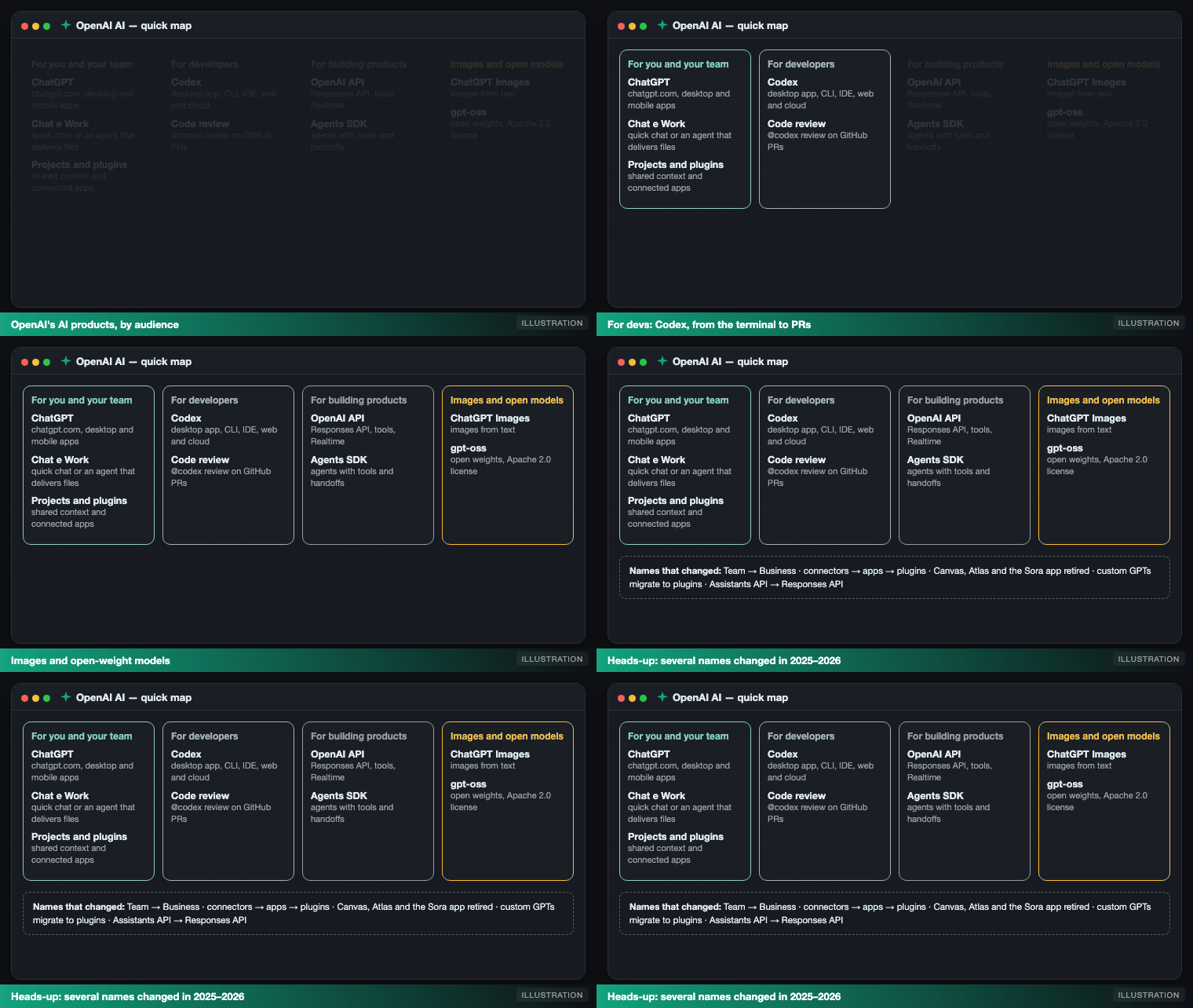 Animated illustration (not a real screenshot): the products in four groups by audience and the line of names that changed. The real interface may use different names and positions.
ChatGPT
Plans
The individual plans are Free, Go, Plus, and Pro. For companies, there’s Business (formerly Team, starting at two users) and Enterprise; for schools and universities, Edu. Features and limits vary by plan and change over time; check the pricing page.
Chat and Work
Since July 2026, ChatGPT is split into two modes, picked with a toggle:
- Chat: fast conversation, for asking, summarizing, translating, and reviewing text. It’s on every plan.
- Work: an agent for longer, multi-step tasks that delivers a finished result: a document, spreadsheet, presentation, PDF, or report. It works on web, mobile, and desktop on eligible paid plans; according to the pricing page, Free has a limited Work allowance in the desktop app.
The desktop app (macOS, Windows, and Linux) brings Chat, Work, Codex, and voice together in one place.
Main features
- Projects: group chats, files, and instructions on one subject; they can be shared and have their own memory.
- Deep research: research across many sources that returns a report with references. Start it from the + menu, the sidebar, or with
/deepresearch. - Memory: ChatGPT remembers preferences and past chats. You control it in Settings › Personalization › Memory and can see which memories were used.
- Plugins: MCP-based integrations with other services, found in the Plugin Directory. In the text box,
@calls a plugin. - ChatGPT Images: creates and edits images inside the chat.
- Voice: ChatGPT Voice uses OpenAI’s new live voice. According to the help center, Advanced and Standard voice retire on December 11, 2026; Read Aloud stays.
The step-by-step, from your first attachment to your first project, is in how to use ChatGPT.
What was retired or changed in 2025–2026
The dates below are the ones given by OpenAI’s help center:
| Before | Now | When |
|---|---|---|
| ChatGPT Team | ChatGPT Business (name change only) | Aug 29, 2025 |
| Connectors | Apps (Dec 2025), then plugins, in the Plugin Directory | Jul 9, 2026 |
| Canvas | Writing and code blocks right in the response | May 28, 2026 |
| ChatGPT agent (agent mode) | ChatGPT Work | Jul 2026 |
| Custom GPTs | Plugins, via “Migrate to plugin” in My GPTs | Retire Dec 11, 2026 |
| ChatGPT Atlas browser | ChatGPT desktop app and Chrome extension | Stopped working Aug 9, 2026 |
| Sora app and website | Discontinued; Sora is no longer part of ChatGPT | Apr 26, 2026 |
| Standalone Codex app | Codex mode inside the ChatGPT desktop app | Jul 2026 |
When a GPT is migrated, its instructions become a skill and its knowledge files become reference files; custom actions don’t transfer. Test the plugin version before the deadline and be wary of tutorials from before 2026.
Codex
Codex is OpenAI’s coding agent: it reads the repository, edits files, and runs commands, asking for approval according to the permission mode. It shows up in several places:
- in the ChatGPT desktop app, in Codex mode;
- in the CLI, in your terminal;
- in the IDE extension (VS Code, Cursor, Windsurf);
- on the web, at chatgpt.com/codex, and in Codex Cloud, which runs tasks on OpenAI-managed machines;
- on GitHub, reviewing pull requests when someone comments
@codex review.
Codex is included in ChatGPT plans. According to the help center, the Free and Go plans have Codex only in the desktop app; CLI, IDE, web, and cloud start at Plus. To install the CLI:
# macOS or Linux (official installer)
curl -fsSL https://chatgpt.com/codex/install.sh | sh

# Windows (PowerShell):
# powershell -ExecutionPolicy ByPass -c "irm https://chatgpt.com/codex/install.ps1 | iex"

# Alternatives: npm install -g @openai/codex  or  brew install --cask codex

# Open your first session inside your project
cd my-project
codex
# On the sign-in screen, choose "Sign in with ChatGPT"
Signing in with your ChatGPT account is recommended for Plus, Pro, Business, Edu, and Enterprise; an API key also works, billed separately and without the cloud features. The /init command creates an AGENTS.md with the project’s instructions. Full guide in how to use OpenAI Codex; to compare it with other tools, see Claude Code, Grok, ChatGPT, and Copilot: when to use each.
The API platform
For people building products:
- Dashboard: still at platform.openai.com, with API keys, usage, limits, projects, and the Playground for testing prompts.
- Documentation: now at developers.openai.com/api/docs. Old platform.openai.com/docs links redirect there.
- Responses API: the recommended interface for new projects, with built-in tools such as web search, file search, code interpreter, remote MCP, and function calling. Chat Completions is still supported.
- Agents SDK: a library for building agents in Python (
pip install openai-agents) and JavaScript/TypeScript. - Realtime API: low-latency voice conversations, over WebRTC or WebSocket.
According to the deprecations page in the docs, there were also important shutdowns:
- Assistants API: shut down on August 26, 2026. The migration path is the Responses API, with Conversations replacing threads.
- Agent Builder: shuts down on November 30, 2026; OpenAI points to the Agents SDK or ChatGPT Workspace Agents.
- Evals: the dashboard, API, and graders shut down on November 30, 2026.
Billing is based on usage. Keep your key in an environment variable, never in code. The step-by-step, from the Playground to your first call, is in how to use the OpenAI API.
gpt-oss: the open-weight models
gpt-oss is OpenAI’s family of open-weight models, in a larger and a smaller size, under the Apache 2.0 license and OpenAI’s own usage policy. There’s also gpt-oss-safeguard, aimed at classifying content against safety policies you define. Because the weights are public, you can run it on your own machine or server without sending data to OpenAI. The simplest way to try it is with Ollama, if your hardware can handle it.
Which product for which task
| If you want to… | Use… |
|---|---|
| Write, summarize, and review text day to day | ChatGPT, in Chat mode |
| Get a finished document, spreadsheet, or presentation | ChatGPT, in Work mode |
| Always work with the same context and files | Projects |
| A report with sources on a topic | Deep research |
| Connect ChatGPT to your company’s other services | Plugins |
| Create or edit images | ChatGPT Images |
| Write code, fix tests, and refactor | Codex (desktop, CLI, or IDE) |
| Review pull requests on GitHub | Codex with @codex review |
| Integrate AI into your system | The Responses API and the dashboard at platform.openai.com |
| Build your own agent | Agents SDK |
| A real-time voice assistant | Realtime API |
| Run an open model without sending data out | gpt-oss (for example, with Ollama) |
Data and privacy
The rule of thumb: company data only on a business plan.
- Consumer plans (Free, Go, Plus, and Pro): your chats may be used to train models unless you turn off Improve the model for everyone in Settings › Data controls.
- Temporary Chat: not used to train models, not shown in your history, doesn’t create memories, and is kept for up to 30 days for safety.
- Business, Enterprise, Edu, and the API: according to OpenAI, not used for training by default. In the API, abuse-monitoring logs are kept for up to 30 days.
Personal data about customers and coworkers is protected by privacy laws such as Brazil’s LGPD or the GDPR: check your plan’s terms and your company’s policy and, when in doubt, ask your legal team. On any plan, never paste secrets, customer data, or production credentials into an AI. See also don’t do this with AI.
Where to start
- Want to use it at work, without coding? Start with how to use ChatGPT.
- Do you code? Install and try Codex on a small project.
- Integrating it into a system? Follow how to use the OpenAI API.
- Want to compare? Read the Anthropic, Google, and Microsoft overviews.
About models: in ChatGPT, use the latest GPT models your plan offers; in the API, copy the current identifier from the models page in the docs.
Checklist
- I know the difference between Chat, Work, and Codex
- I know which plan my company uses and whether it includes Work and Codex
- If I use custom GPTs, I tested the migration to plugins before December 11, 2026
- I updated bookmarks and links to developers.openai.com/api/docs
- I reviewed the “Improve the model for everyone” setting (consumer plans)
- I keep API keys in environment variables, never in code
- I don’t paste secrets, customer data, or production credentials into any AI
With OpenAI, the question isn’t “which ChatGPT is best” but which door you use — Chat, Work, Codex, the API, or gpt-oss — and which data rules come with it.